Mastering Rich Media: How to Create WhatsApp Catalogs and Carousels | Unifonic
Mastering Rich Media: How to Create WhatsApp Catalogs and Carousels | Unifonic
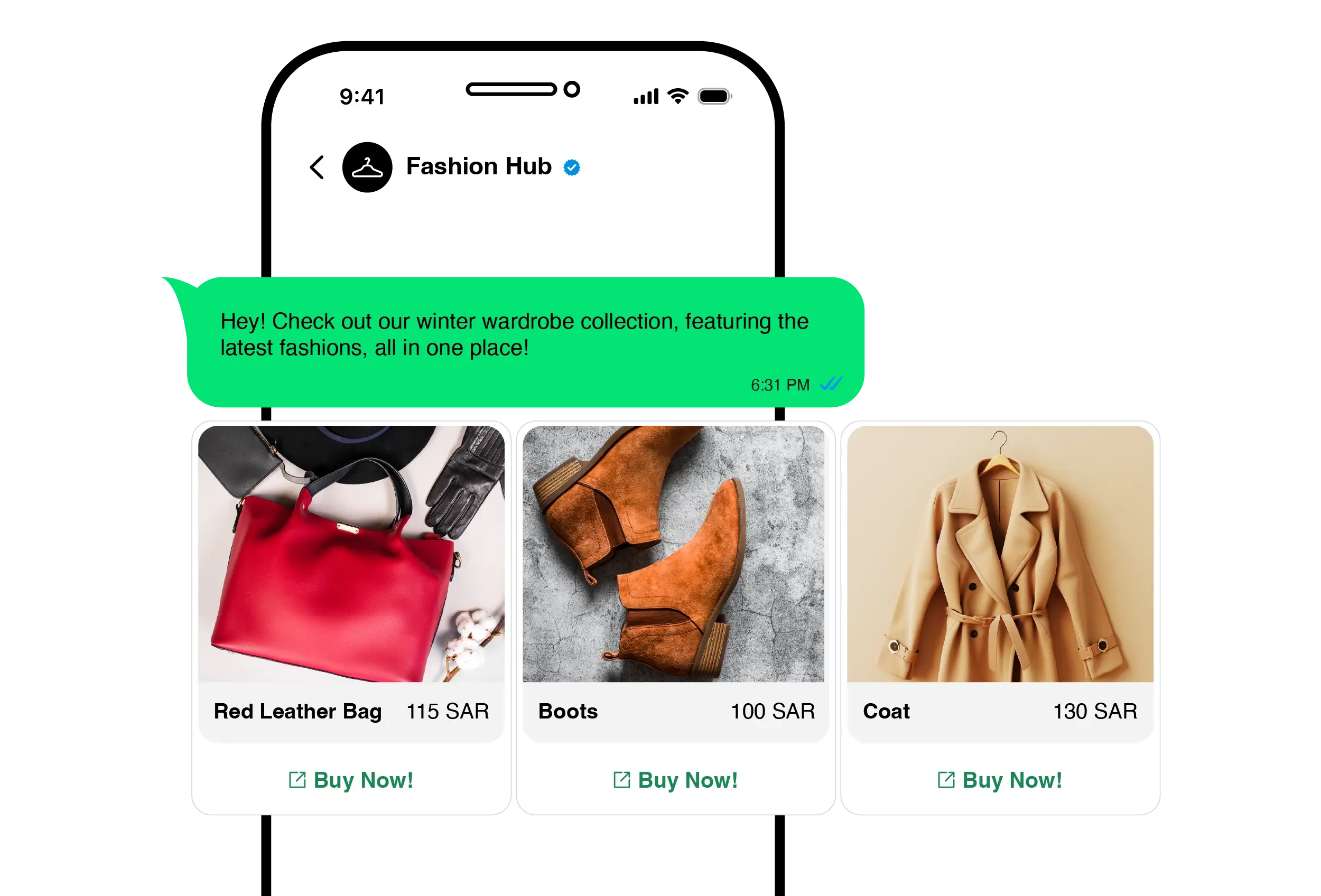
Mastering Rich Media: How to Create WhatsApp Catalogs and Carousels
To make a Catalogue message or create interactive Carousel messages on WhatsApp, businesses must utilize the WhatsApp Business API through a specialized enterprise platform like Unifonic. By configuring API endpoints to send structured rich‑media JSON payloads, businesses can generate swipeable product carousels and dynamic catalog messages that allow customers to browse and select products within the WhatsApp conversation
The Digital Struggle of Text-Heavy Commerce
In the highly competitive e-commerce landscape, relying on plain text messages and static URL links to showcase products is a losing strategy. When customers receive a block of text with a link asking them to "click here to view our catalog," it introduces friction. This redirect breaks the conversational flow, often leading to slow-loading mobile browsers, immediate drop-offs, and lost revenue.
Transitioning from these high-friction digital struggles to seamless human victories—where a customer excitedly discovers and purchases a product in seconds—requires rich media. Carousel messages address this by allowing businesses to present multiple horizontally scrollable cards in a single message, each featuring rich imagery, product information, and interactive call‑to‑action (CTA) buttons.
Designing Guided Choice, Not Just Visual Messages
WhatsApp carousels are more than visual displays—they are designed to guide customer decisions. Each carousel card can combine rich imagery with interactive buttons, allowing businesses to offer clear, structured choices rather than open‑ended conversations.
Instead of asking customers to type what they want, teams can present curated options—such as product categories, featured items, or next steps—helping customers move forward with less friction and greater confidence.
Elevating Engagement with Agentic CX
Unifonic is the AI-native CX platform for emerging markets, enabling enterprises to deliver adaptive, predictive, and ROI-driven customer experiences. We elevate standard rich media messaging through our automated Agentic CX solutions.
Rather than sending a static, generic product carousel to your entire user base, our coordinated AI agents reason, act, and collaborate with humans to drive measurable outcomes. An AI agent can analyze a customer's real‑time intent—for example, if they ask for ‘running shoes under a specific price’—and orchestrate the delivery of a personalized WhatsApp Carousel featuring relevant products retrieved from connected systems. If the user clicks a ‘Talk to Sales’ button on one of the cards, the AI seamlessly routes the conversation—along with the relevant product context—to a human associate.
This intelligent orchestration is built on over 25 years of Conversational AI R&D and nearly two decades of market experience since 2006. This foundation ensures that your rich media interactions are delivered with cultural fluency and strict adherence to data sovereignty, safeguarding privacy while maximizing conversion rates in diverse regional markets.
Carousels & Catalogs in Multichannel Campaigns (No Code Required)
WhatsApp catalogs and carousel messages don’t have to be built or launched by developers. Within Unifonic’s Multichannel Campaigns, marketing and growth teams can create, reuse, schedule, and scale rich media templates directly from the platform—just like any other campaign asset.
This means teams can launch product showcases, seasonal promotions, or curated offers on WhatsApp without managing APIs or payloads, while still maintaining full control over timing, audience targeting, and performance tracking.
Measuring Engagement Beyond Opens and Reads
Rich media campaigns aren’t just more engaging—they’re also more measurable. When WhatsApp carousels and catalog templates are launched through Unifonic’s Multichannel Campaigns, teams can track meaningful engagement signals such as button clicks and downstream actions, not just message delivery.
By tying rich media messages to campaign goals, teams gain clearer insight into which products, formats, and calls‑to‑action resonate most—enabling smarter optimization over time.
Technical Guide: Generating Interactive Product Carousels via API
For develop specific execution, creating a WhatsApp Carousel requires formatting a specific JSON payload via the Unifonic API. Below is an example of how an interactive carousel message can be generated using the Unifonic API.
Step 1: Define the Message Type
Your POST request must specify that the message type is a template and the template type includes a carousel. Ensure your carousel template has been submitted and approved in line with Meta’s WhatsApp Business Platform requirements.
Step 2: Structure the Cards Payload
A carousel is made up of individual "cards." Each card must contain:
- Header: An image or video media ID.
- Body: Text detailing the product name and price.
- Buttons: Up to two interactive buttons per card (e.g., Quick Reply or URL).
Example JSON Payload Structure:
JSON
{
"messaging_product": "whatsapp",
"recipient_type": "individual",
"to": "+1234567890",
"type": "template",
"template": {
"name": "summer_sale_carousel",
"language": {
"code": "en"
},
"components": [
{
"type": "carousel",
"cards": [
{
"card_index": 0,
"components": [
{ "type": "header", "parameters": [ { "type": "image", "image": { "id": "media_id_1" } } ] },
{ "type": "body", "parameters": [ { "type": "text", "text": "Classic White Sneakers - $50" } ] },
{ "type": "button", "sub_type": "quick_reply", "index": "0", "parameters": [ { "type": "payload", "payload": "buy_sneakers_01" } ] }
]
},
{
"card_index": 1,
"components": [
{ "type": "header", "parameters": [ { "type": "image", "image": { "id": "media_id_2" } } ] },
{ "type": "body", "parameters": [ { "type": "text", "text": "Running Shoes - $75" } ] },
{ "type": "button", "sub_type": "quick_reply", "index": "0", "parameters": [ { "type": "payload", "payload": "buy_running_02" } ] }
]
}
]
}
]
}
}
Step 3: Configure Webhooks for Postbacks
When a user taps a button within the carousel (like "Buy Now"), Meta sends a webhook payload back to your server containing the specific payload string (e.g., buy_sneakers_01). Your backend must be configured to parse this payload and trigger the next automated Agentic CX step, such as routing the user to a relevant commerce or support flow.
Built‑In Governance for Enterprise WhatsApp Campaigns
All carousel and catalog templates follow the same approval and governance process as other WhatsApp templates. Teams can submit templates for approval, track their status, and reuse approved assets across multiple campaigns—ensuring consistency, compliance, and predictable execution.
This built‑in governance helps enterprises move faster on WhatsApp without sacrificing control, brand alignment, or adherence to Meta policies
Personalizing Rich Media by Audience Segment
Not every customer should see the same catalog or carousel. With Unifonic’s campaign targeting and audience segmentation, teams can tailor rich media experiences based on customer attributes, behavior, or engagement history.
This allows businesses to present more relevant products, offers, or collections to different segments—whether that’s new customers, repeat buyers, or specific regional audiences—without creating entirely separate campaigns from scratch
Actionable Takeaways: Your Rich Media Implementation Checklist
To effectively deploy WhatsApp Catalogs and Carousels, follow these operational best practices:
- Optimize Media Assets:
Ensure all header images are high-resolution but compressed appropriately, maintaining an aspect ratio of 1.91:1 to prevent awkward cropping in the chat interface.
- Pre-Approve Templates:
- Limit Cognitive Overload:
- A/B Test Button Copy:

Related articles

06 January 2023
The Benefits of using an IVR System in your call center

23 June 2022